Deus XT for iPad and Apple PencilNo ink on the glassPressure, tilt and hover reach your computer$14.99, onceOne purchase, everything includedThe companion is freeDeus XT for iPad and Apple PencilNo ink on the glassPressure, tilt and hover reach your computer$14.99, onceOne purchase, everything includedThe companion is free
The cable gives the steadiest connection. Deus XT uses it whenever it is plugged in.
3 stepsiPad + Mac
On this page
Plug in
Plug the iPad into the Mac with a USB-C cable and unlock the iPad.Some cables only charge and carry no data. If nothing happens, try another cable.
If the iPad asks whether to trust this computer, tap Trust.
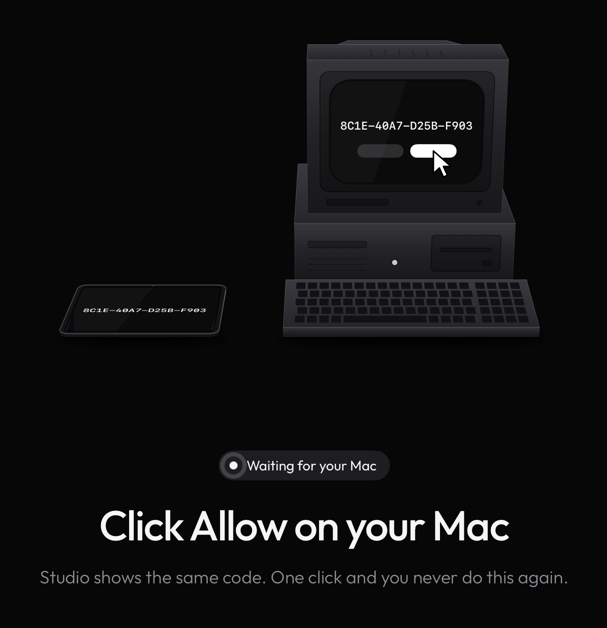
Pair the first time.The iPad asks whether to pair with that Mac for Wi-Fi as well, and the Mac lists the iPad under Settings › iPad with a Pair button. Check that both show the same code, then confirm on both; nothing is trusted until you do.
Check that both show the same code, then confirm on both; nothing is trusted until you do.
Auto route
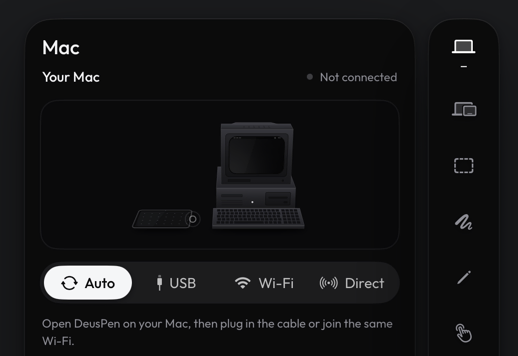
With the route on Auto, Deus XT uses the cable whenever it is plugged in, and Wi-Fi when it is not. You can choose the route in the Mac panel of the side rail.
You can choose the route in the Mac panel of the side rail.With the route on Auto, Deus XT uses the cable whenever it is plugged in, and Wi-Fi when it is not.
What travels over the cable
The USB cable carries data only between the iPad and the Mac it is plugged into.
Still stuck? Email support@deuspen.com with your iPad and computer models, the app you draw in, whether you were on the cable or Wi-Fi, and what you expected. The Diagnostics panel in the companion's Settings shows the connection state in words; tell us what it says.